Note: The Setup page is only available to companies enrolled in ACA Reporting.
Navigate to Setup
Layout
- Co & Aggregate
- Earnings
- Cost & Compliance
- Time Periods
- Status
Navigate to Setup
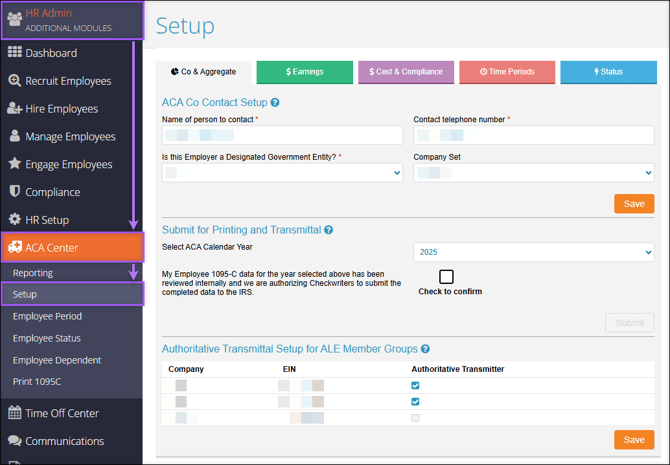
Find the Setup page by navigating to HR Admin (module) → ACA Center → Setup.
Layout
The following sections describe each of the tabs under Setup.
Co & Aggregate
ACA Co Contact Setup
The information entered in this section is related to IRS Form 1094-C.
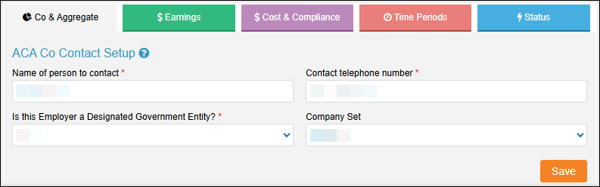
- Name of person to contact: The contact responsible for answering IRS questions regarding the information on and filing of Form 1094-C and Form 1095-C.
- Contact telephone number: Phone number of the contact.
- Is this Employer a Designated Government Entity?: A Designated Government Entity (DGE) is a person or persons a part of or related to the Governmental Unit that is the ALE Member, and that is appropriately designated for purposes of these reporting requirements.
- Company Set: This only applies if your organization is part of an Aggregated Employer Group. If this applies to your organization and a company set is not available in the dropdown, please contact ACATeam@checkwriters.com.
Submit for Printing and Transmittal
Important: This section should be completed only once the reporting year has come to a close and you have thoroughly reviewed your ACA Data for the selected year. Learn more about end-of-year using our ACA Year-End Checklist.
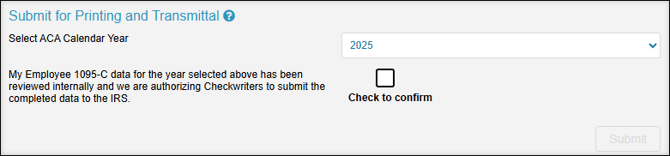
- Select ACA Calendar Year: The Reporting Year that you are submitting.
- Check to Confirm: By checking this box, you certify that the 1095-C data for the selected year has been thoroughly reviewed, and you authorize Checkwriters to process and submit the completed data to the IRS.
- Submit: Select Submit to finalize your records for Checkwriters.
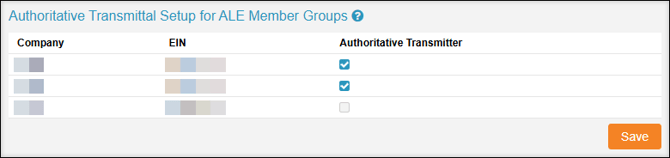
Authoritative Transmittal Setup for ALE Member Groups
This section is reserved for companies assigned to a Company Set as part of an Aggregated Employer Group. Each Company Code within the Company Set will be listed in this section.
Each Employer Identification Number (EIN) should have only one Authoritative Transmitter. If multiple Company Codes share the same EIN, you must select only one Company Code to be the Authoritative Transmitter.
Important: Each EIN must have one Authoritative Transmitter associated with it.
Earnings
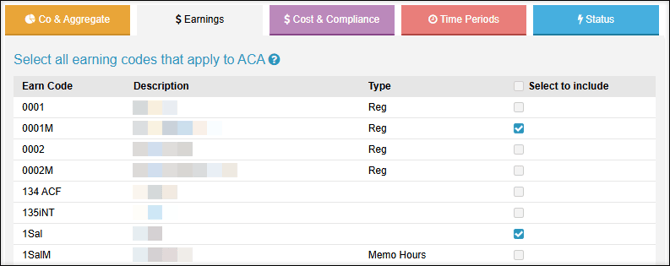
The Earnings tab defines the earning codes used in the “hours of service” calculation when running ACA reports, including the Full-Time Equivalent Monthly and Benefit Eligibility reports.
For purposes of the Employer Shared Responsibility provisions, what is an hour of service?
Generally, an “hour of service” refers to both:
- Each hour for which an employee is paid, or entitled to payment, for the performance of duties for the employer.
- Each hour for which an employee is paid, or entitled to payment, for a period of time during which no duties are performed due to vacation, holiday, illness, incapacity (including disability), layoff, jury duty, military duty, or leave of absence.
Cost & Compliance
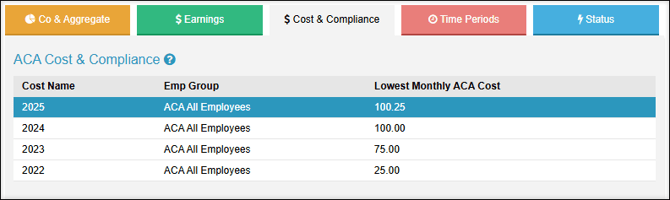
Cost and Compliance records provide critical health plan information needed to determine the appropriate filing codes displayed on Form 1095-C. The records defined here should reflect the lowest-cost Single health plan offered at your company.
Best Practice: Cost and Compliance records are a critical part of the ACA setup process. We highly recommend you consult your ACA Legal Counsel or Insurance Broker before setting these records.
Since Cost and Compliance records are a critical part of the ACA setup process, we highly recommend that you consult with your ACA Legal Counsel or Insurance Broker before setting these records.
More Info: Learn more about ACA Center: Cost & Compliance Setup.
Time Periods
Note: This section is an optional information-tracking feature that has no impact on ACA Reporting through Checkwriters.
Employers can determine their time periods on their own or seek counsel through their brokers and legal advisors.
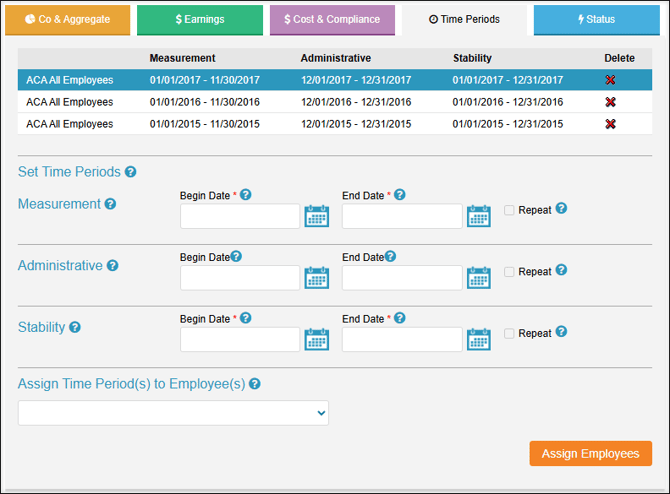
Measurement
A standard Measurement Period is a designated time period used to determine whether an employee with varying hours or a seasonal employee is full-time and eligible for health coverage. You may define the standard measurement period, but it must be at least three and not more than 12 consecutive months.
Administrative
Employers may want some time between the Measurement Period and the Stability Period to determine coverage for, notify, and enroll employees. This period, called the Administrative Period, can be up to 90 days. For most employers, however, this period is often shorter and coincides with their open enrollment period.
Stability
Employees found to be full-time during the Measurement Period must remain eligible for health coverage throughout the Stability Period. This period must be at least six and not more than twelve months, and it cannot be longer than the measurement period. For many employers, the stability period will be the standard benefits plan year.
Status
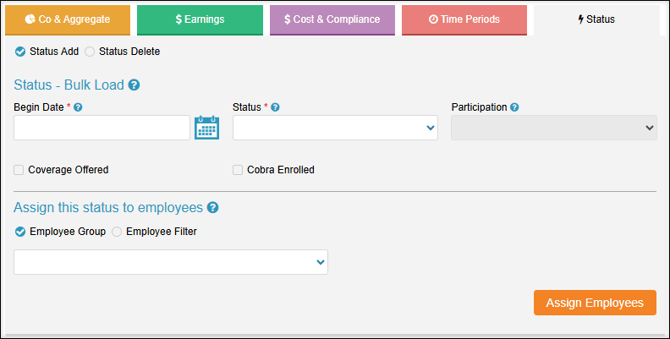
The Status tab is used to bulk-load statuses for employees when setting up your account with a Checkwriters ACA Team specialist.