
These reports will be delivered to your Report Vault or to your predetermined Secure File Transfer Protocol (SFTP) location. This SFTP server is hosted by your company, and we'll work together to connect it to Checkwriters.
Schedule a Report Delivery
Navigate to Reporting (module) → Report Writer.
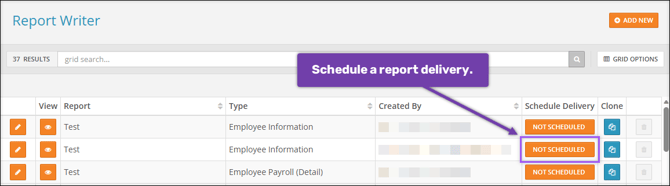
To set up a delivery schedule for a specific report, select the Not Scheduled button for that report. This will open the Schedule Delivery aside.
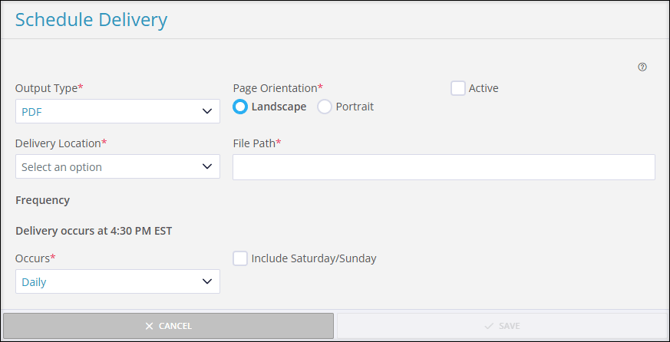
Fill out the following fields to set the schedule parameters:
- Output Type: Choose the file type you want your report to generate as. The default type is PDF.
- Page Orientation: Choose whether your report will be displayed in Landscape or Portrait.
- Active: Select this checkbox to activate the schedule.
- Delivery Location: Select where the report should be delivered.
- Report Vault: Reports will be delivered to Reporting (module) → Report Vault → Other (tab).
- SFTP Delivery Location: You may also set up a connection to your SFTP delivery location. To do so, please contact Checkwriters Integrations Team at integrations@checkwriters.com.
- File Path: Provide a valid file path to which your reports will be delivered.
- Occurs: Select whether this report should be delivered Daily, Weekly, or Monthly.
- If Daily, use the Include Saturday/Sunday checkbox to indicate whether the report should also be delivered on weekends.
- If Weekly, use the Day of Week dropdown menu to select which day the report will be delivered.
- If Monthly, use the Day of the Month textbox to enter which day of the month the report will be delivered, 1-31. If a month has fewer days than the number entered, the report will be delivered on the last day of the month.
- For example, if you enter "31", the report will always be delivered on the last day of the month.
After completing all of the required fields, select Save.
Important: You must select the Active checkbox to complete the schedule.
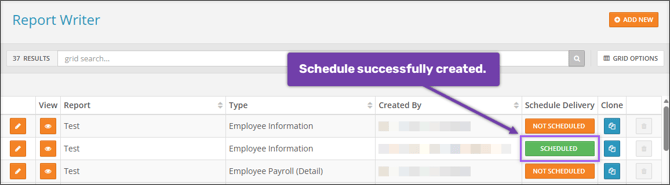
Note: Reports will be delivered at 4:30 PM EST on the assigned day.