
For 2026, these exceptions no longer apply, and more information must be listed on the W-2s; refer to the sections below for more details on:
- Qualified Overtime - "No Tax on Overtime"
- Qualified Tips - "No Tax on Tips"
- Treasury Tipped Occupation Code (TTOC)
More Info: Refer to the Internal Revenue Service for more information on these OBBBA changes.
Tip: Learn about our OBBBA Audit Report.
Qualified Overtime – "No Tax on Overtime"
Effective for tax years 2025 through 2028, individuals who receive qualified overtime compensation may deduct the pay that exceeds their regular rate of pay.
For example, the "half" portion of "time-and-a-half" compensation is required by the Fair Labor Standards Act (FLSA) and is reported on a Form W-2, Form 1099, or other specified statement furnished to the individual.
What does this mean for you?
- Review your current overtime rules and confirm they follow the FLSA rules.
- Ensure your overtime earnings are assigned the correct pay type.
The following pay types should be used, where applicable, to correctly report on the Form W-2:
- OT - Overtime Pay
- OT-Weighted - Weighted Average Overtime
- OT-AL - Alabama Overtime
- OT-AL-Weighted - Alabama Weighted Average Overtime
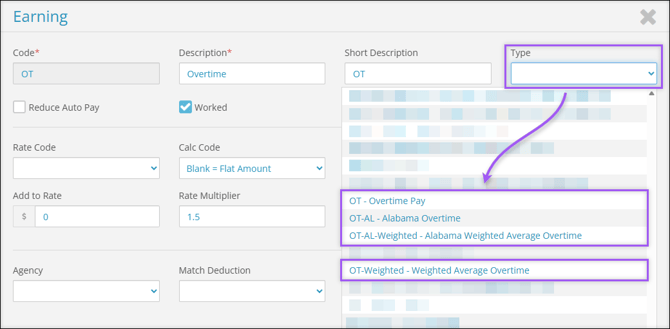
Important: These pay types will ensure only the overtime premium portion will be reported on Form W-2, Box 12 with code TT.
Note: With the correct pay type selected, the system will calculate the qualified overtime premium as follows: (Total Overtime Amount ÷ Rate Multiplier) ÷ 2
Divide the Total Overtime Amount by the Rate Multiplier and then divide the result by two.
To find the Rate Multiplier field, navigate to Company (module) → Company Setup → Earnings → Seelct Edit  → Rate Multiplier.
Memo QOT – Memo Qualified Overtime
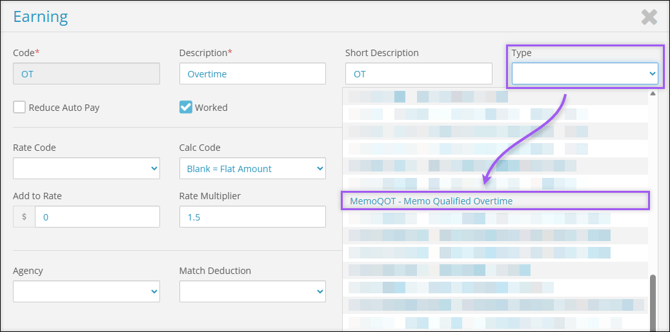
Alternatively, and if needed, you can use the MemoQOT - Memo Qualified Overtime pay type to override the qualified overtime amount that is to be reported on Form W-2.
This can be used to provide the exact overtime premium amount that should be reported under OBBBA.
This option can also be used by employers who wish to calculate the qualified overtime premium amount independently and want to provide the exact amount to be reported.
These amounts can also be imported. If you’re interested in this option, contact Checkwriters Client Support at support@checkwriters.com.
Note: The MemoQOT pay type is a memo code and does not pay additional wages to the employee. The amount entered or imported must be the exact qualified overtime premium amount that should appear in Box 12, Code TT on Form W-2.
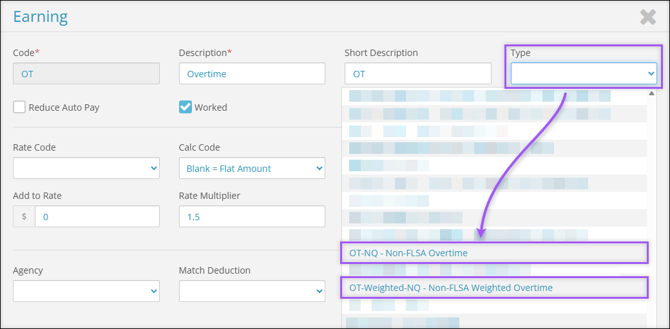
Important: When overtime does not meet the definition of qualified overtime under FLSA rules, the following pay types should be used:
- OT-NQ - Non-FLSA Overtime
- OT-Weighted-NQ - Non-FSLA Weighted Overtime
Using these pay types will ensure no overtime premium is reported on Form W-2.
Qualified Tips – "No Tax on Tips"
Effective for tax years 2025 through 2028, specific employees and self-employed individuals, as defined by the IRS, may deduct qualified tips. These tips are reported on a Form W-2, Form 1099, or another specified statement furnished to the individual or reported directly by the individual on Form 4137.
Note: "Qualified tips" are voluntary cash or charged tips received from customers or through tip sharing.
What does this mean for you?
- Confirm that your tipped earnings qualify.
- Ensure that your tipped earnings are assigned the correct pay type:
- Cash tips
- Charged tips
This ensures that tips are reported correctly on Form W-2, Box 7 (Social Security Tips), and qualified tips are reported in Box 12, Code TP.
More Info: Learn more about Pay Type & Tip Earnings.
Treasury Tipped Occupation Code (TTOC)
Employees who received qualified tips must have a Treasury Tipped Occupation Code (TTOC) reported in Box 14b.
What does this mean for you?
Within Checkwriters, navigate to HR Admin → Manage Employees → Demographics to confirm that each tipped employee has the appropriate Standard Occupational Classification (SOC) code assigned to their profile. In some cases, a SOC code is directly tied to the appropriate TTOC.
For example, an employee working primarily as a bartender and secondarily as waitstaff should have “35-3011 - (TTOC: 101) Bartenders” in the Std Occupational Classification (SOC) field and “102” (waitstaff TTOC) in the Secondary Treasury Tipped Occ. Code field.
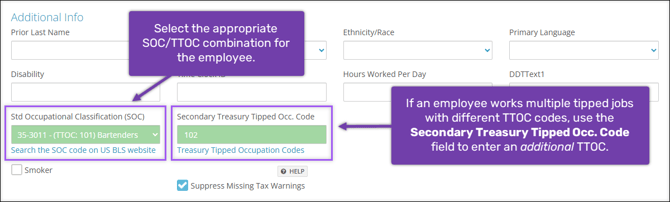
Note: If an employee worked multiple tipped occupations, use the Secondary Treasury Tipped Occ. Code field to report the additional occupation.
More Info: Learn more about Treasury Tipped Occupation Codes from the IRS and how they function within Checkwriters.