---
title: "February '26 Release Notes: New Users, Timesheet Reports, Imports, etc."
description: "These February 2026 release notes describe updates to the following: Register New User, Employee Onboarding Email, Timesheet Reports, Imports, Company Deduction and Earning Codes, and Reduce Auto Pay"
---
[Skip to content](https://help.checkwriters.com/knowledge/february26-releasenotes#main-content)
English
Show submenu for translations

Open main navigation
Close main navigation
- English
Show submenu for translations
- [Checkwriters Login](https://www.checkwriterspayrollhr.com/)
[Checkwriters Login](https://www.checkwriterspayrollhr.com/)
Hello. How can we help you?
- There are no suggestions because the search field is empty.
1. [Checkwriters Knowledge Base](https://help.checkwriters.com/knowledge?hsLang=en)
2. [Release Notes](https://help.checkwriters.com/knowledge/release-notes?hsLang=en)
3. [2026 Release Notes](https://help.checkwriters.com/knowledge/release-notes?hsLang=en#2026-release-notes)
# February '26 Release Notes: New Users, Timesheet Reports, Imports, etc.
## These release notes document improvements to the Checkwriters software released throughout the month of February 2026.
[Improvements](https://help.checkwriters.com/knowledge/february26-releasenotes#improvements)
- [Register New User](https://help.checkwriters.com/knowledge/february26-releasenotes#new-user)
- [New Employee Onboarding Email](https://help.checkwriters.com/knowledge/february26-releasenotes#onboarding)
- [Reporting](https://help.checkwriters.com/knowledge/february26-releasenotes#reporting)
- [Timesheet Report - Date Range](https://help.checkwriters.com/knowledge/february26-releasenotes#date-range)
- [Timesheet Reports & Semi-Monthly/Monthly Calendars](https://help.checkwriters.com/knowledge/february26-releasenotes#semi-monthly)
- [Imports](https://help.checkwriters.com/knowledge/february26-releasenotes#imports)
- [Company Deduction and Earning Codes](https://help.checkwriters.com/knowledge/february26-releasenotes#deduction-earning)
- [Reduce Auto Pay](https://help.checkwriters.com/knowledge/february26-releasenotes#reduce-auto-pay)
### Improvements
#### Register New User
To address an issue for our mobile users, we added a **Register new user?** link on the login page. This link redirects users to the Registration Code page, where they can enter the code sent via email.
Previously, there was no easy way for mobile users to access the registration code page.
#### New Employee Onboarding Email
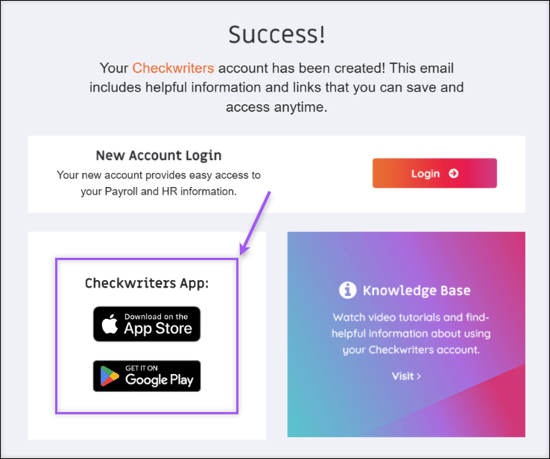
To help improve the onboarding experience for new ESS users, we have added links to the Google and Apple app stores in Onboarding emails.
#### Reporting
##### Timesheet Report - Date Range
For users who run the **Attendance → Time Reports → Timesheet Report - Date Range** report, we are now pulling the data that falls within the start and end dates selected for the report, regardless of check date.
Previously, we were pulling in the check dates between the start/end dates.
##### Timesheet Reports & Semi-Monthly/Monthly Calendars
For users with access to **Attendance → Time Reports**, we have updated these timesheet reports to support semi-monthly/monthly calendars:
- Timesheet Report
- Timesheet Report (In/Out) - Excel
- Timesheet Report (with In/Out)
#### Imports
For users with access to **Reporting → Import Data**, we now offer a pre-formatted Excel template that can be downloaded for use with the following imports:
- Employee
- Employee Accrual
- Employee Dependent
- Employee Deduction
- Employee Fringe
- Employee Rate
- Company Job
For users with access to **Attendance → Attendance Import → Import**, we now offer a pre-formatted Excel template that can be downloaded for use with the following imports:
- Time Clock Import (dropdown selection)
- Timesheet Import (dropdown selection)
Depending on the import type, the template file will have at least two tabs:
1. The first tab is a pre-formatted template with the column headers in the required order; use this template to enter data for import.
1. For required fields, column headers are clearly highlighted and stand out from the non-required columns.
2. The second tab, or any additional tabs, detail the import file requirements, including required fields, data types, maximum field length, etc.
**Note:** It is not necessary to delete or remove the additional tabs (with the requirements) before importing; the import will process only the data entered on the first tab.
#### Company Deduction and Earning Codes
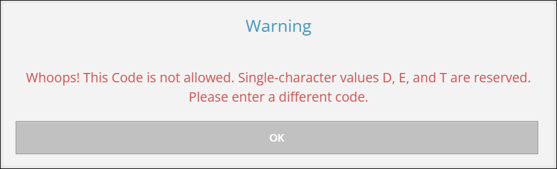
For users with access to **Company Setup → Deductions or Earnings,** we enhanced the system to prevent the creation of Deduction or Earning codes that are reserved code values. Reserved code values for deductions and earnings are D, E, and T.
If a reserved value is entered as the deduction or earning **Code**, a warning message will be displayed when the user selects the save button on the page.
#### Reduce Auto Pay
We added new documentation to our Knowledge Base that describes the Reduce Auto Pay feature for earnings codes. This feature helps ensure a salaried employee is paid accurately by automatically adjusting default hours after time off is entered in Payroll.
**Read the article:** [Earnings: Reduce Auto Pay](https://help.checkwriters.com/knowledge/earnings-reduce-auto-pay?hsLang=en)
- [Employee Self-Service](https://help.checkwriters.com/knowledge/employee-self-service?hsLang=en#main-content)
- [My Dashboard](https://help.checkwriters.com/knowledge/employee-self-service?hsLang=en#my-dashboard)
- [My Info](https://help.checkwriters.com/knowledge/employee-self-service?hsLang=en#my-info)
- [My Payroll](https://help.checkwriters.com/knowledge/employee-self-service?hsLang=en#my-payroll)
- [My Time](https://help.checkwriters.com/knowledge/employee-self-service?hsLang=en#my-time)
- [Settings](https://help.checkwriters.com/knowledge/employee-self-service?hsLang=en#settings)
- [My Documents](https://help.checkwriters.com/knowledge/employee-self-service?hsLang=en#my-documents)
- [HR Admin](https://help.checkwriters.com/knowledge/hr-admin?hsLang=en#main-content)
- [Recruit Employees](https://help.checkwriters.com/knowledge/hr-admin?hsLang=en#recruit-employees)
- [Hire Employees](https://help.checkwriters.com/knowledge/hr-admin?hsLang=en#hire-employees)
- [Manage Employees](https://help.checkwriters.com/knowledge/hr-admin?hsLang=en#manage-employees)
- [Compliance](https://help.checkwriters.com/knowledge/hr-admin?hsLang=en#compliance)
- [ACA Center](https://help.checkwriters.com/knowledge/hr-admin?hsLang=en#aca-center)
- [Communications](https://help.checkwriters.com/knowledge/hr-admin?hsLang=en#communications)
- [Document Center](https://help.checkwriters.com/knowledge/hr-admin?hsLang=en#document-center)
- [Security Control Center](https://help.checkwriters.com/knowledge/hr-admin?hsLang=en#security-control-center)
- [Company](https://help.checkwriters.com/knowledge/company?hsLang=en#main-content)
- [Two-Factor Authentication (2FA)](https://help.checkwriters.com/knowledge/company?hsLang=en#two-factor-authentication-2fa)
- [Accruals](https://help.checkwriters.com/knowledge/company?hsLang=en#accruals)
- [Earnings](https://help.checkwriters.com/knowledge/company?hsLang=en#earnings)
- [EE Custom Fields](https://help.checkwriters.com/knowledge/company?hsLang=en#ee-custom-fields)
- [Payroll](https://help.checkwriters.com/knowledge/payroll?hsLang=en#main-content)
- [Payroll](https://help.checkwriters.com/knowledge/payroll?hsLang=en#payroll)
- [Taxes](https://help.checkwriters.com/knowledge/payroll?hsLang=en#taxes)
- [Time Management](https://help.checkwriters.com/knowledge/time-management?hsLang=en#main-content)
- [Time Management](https://help.checkwriters.com/knowledge/time-management?hsLang=en#time-management)
- [Time Off Center](https://help.checkwriters.com/knowledge/time-management?hsLang=en#time-off-center)
- [Reporting](https://help.checkwriters.com/knowledge/reporting?hsLang=en#main-content)
- [Standard reports](https://help.checkwriters.com/knowledge/reporting?hsLang=en#standard-reports)
- [Custom reports](https://help.checkwriters.com/knowledge/reporting?hsLang=en#custom-reports)
- [Release Notes](https://help.checkwriters.com/knowledge/release-notes?hsLang=en#main-content)
- [2026 Release Notes](https://help.checkwriters.com/knowledge/release-notes?hsLang=en#2026-release-notes)
- [2025 Release Notes](https://help.checkwriters.com/knowledge/release-notes?hsLang=en#2025-release-notes)
- [2024 Release Notes](https://help.checkwriters.com/knowledge/release-notes?hsLang=en#2024-release-notes)
[](http://checkwriters.com)
[mailto:email@email.com](mailto:email@email.com)
Copyright © 2026, Checkwriters, Inc.