Are you the employer? Take a look at our Document Type Security article for information on setting up document uploads for your employees.
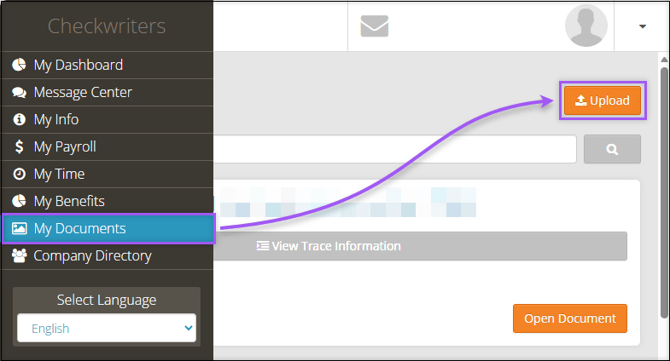
To begin uploading a document, log in to checkwriters online or via the mobile app, navigate to My Documents, and select Upload. If you do not see the upload button, you have not been assigned any document types that allow uploads. If this is the case, reach out to your employer.
After selecting Upload, the Document Upload aside will appear.
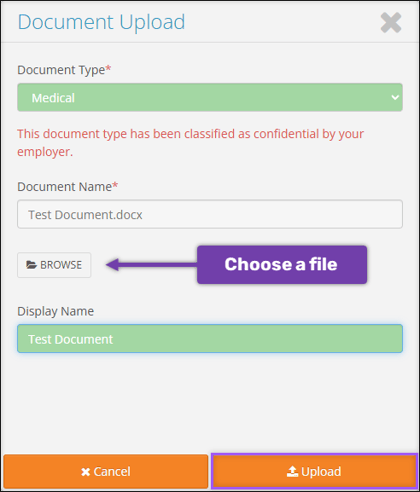
- Select a Document Type from the dropdown. A note will indicate when a document type has been classified as Confidential by your employer.
- Select Browse to select a file to upload.
- Supported file types include PDF, DOC, DOCX, TXT, XLS, XLSX, PNG, GIF, BMP, JPG, and JPEG.
- File names must be less than 50 characters.
- Files cannot contain commas.
- Files must be less than or equal to 10 MB.
- Enter a Display Name for this document. Display Names should be short, but descriptive. The document will appear under this title in the My Documents section.
- Select Upload.
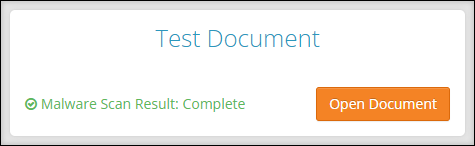
Important: Uploaded files are scanned for malware. If a file fails the malware scan, you will be asked to upload a new file.
After a successful upload, the document will be listed in My Documents under the Display Name you entered.