New Features
- Employee Onboarding – Document Upload
Improvements
- Payroll – Clickable Help Icons
Feature Fixes
- Timesheet Hours
- Attendance – Time Clock Tardy Report
- Retirement – MARIS File Export
- User Access and Rights – Filtering
New Features
Employee Onboarding – Document Upload
We have added new functionality for Premier Clients, allowing employees to upload documents in their Checkwriters ESS portal and during the Onboarding procces.
More Info: Learn more about ESS and Onboarding Document Uploads.
Improvements
Payroll – Clickable Help Icons
All pages in our Payroll module now feature a clickable help icon  .
.
Previously, this was a "hover over" icon, which a made navigation difficult on some pages.
Feature Fixes
Timesheet Hours
We have corrected an issue where an employee's timesheet showed different hours between the Timesheet Details and the Timesheet Approval screens.
This issue occured when the user quickly switched between pay periods on the Timesheet Entry screen and then entered time. While this issue was not reported often, we have implemented system changes to prevent it from happening in the future.
Attendance – Time Clock Tardy Report
For users with access to Attendance → Reporting → Time Reports, the report “Time Clock Tardy Report (Scheduling)” will now accurately report CST time. Previously, when CST was selected, the report still used EST.
Retirement – MARIS File Export
We have resolved an issue where employees were listed multiple times in the export file.
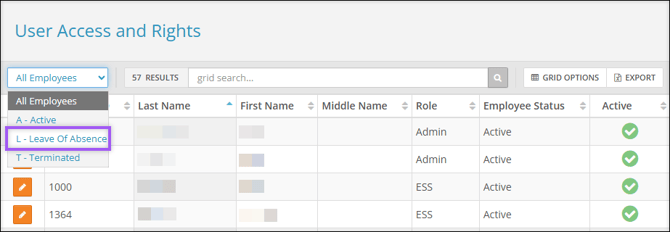
User Access and Rights – Filtering
For users with access to Security Control Center → User Access and Rights, we have added Leave of Absence to the employee filter list. Leave of Absence employees with an inactive user account will now be displayed.