
Use this checklist to ensure your ACA records are complete in preparation for year-end reporting.
- ✅Review Company Contact Information - This information can be found in the ACA Center >> Setup >> Co & Aggregate tab.
- ✅Review Cost & Compliance records for accuracy including any safe harbors that may apply.
- ✅Review Validation Report and correct errors.
- ✅Review Status records for accuracy and make edits as necessary. The ACA - Employee Status report will give you a full listing of status records for the reporting year.
- ✅For Self-Insured Health plans only - if you administer a self-insured health plan, verify that covered dependents are correctly recorded on the 1095C. The ACA - Dependent Status report will give you a full listing of status records for the reporting year.
- ✅ALE Member Groups - For employers who are part of an Aggregated Employer Group, verify that all members are included in the ACA Center >> Setup >> Co & Aggregate tab under Authoritative Transmittal Setup for ALE Member Groups.
- ✅Submit Records AFTER all records have been thoroughly reviewed. Records should not be submitted before January 1st.
Note: If your company is part of a multi-company employer group, the following may apply to you:
Small organizations with fewer than 50 Full-Time Employees (FTEs) are not classified as Applicable Large Employers (ALEs). However, common ownership may lead to the aggregation of smaller organizations for ACA purposes, resulting in a total FTE count of 50 or more.
More Info: Visit the IRS website to determine if this situation applies to your company: Determining if an employer is an applicable large employer.
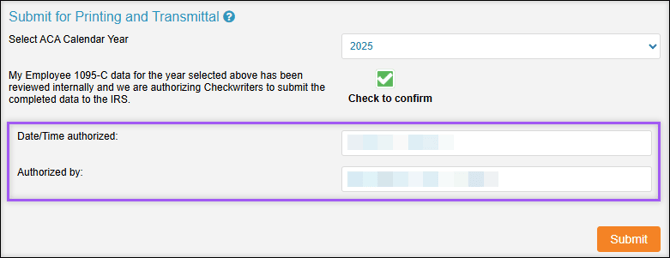
To submit, navigate to ACA Center → Setup → Co & Aggregate → Submit for Printing and Transmittal.
- Select the appropriate ACA Calendar Year from the dropdown menu.
- Select Check to Confirm, verifying that all employee 1095-C data has been internally reviewed and that Checkwriters can submit the data to the IRS.
- Select Submit. Upon successful submission, the Date/Time authorized and Authorized by fields will populate.
Note: If your organization is part of an ALE Member Group, all entities must be reviewed and submitted separately.
For additional questions, please contact Checkwriters ACA Team at ACATeam@checkwriters.com.