
For Premier companies, we have added a tab to Employee Onboarding to capture employee Form I-9 information. This information can be managed in the Compliance section of HR Admin.
Employee Onboarding "Form I-9" Tab
Collect Form I-9 Information During Onboarding
Manage Employee Form I-9 Information
Employee Onboarding "Form I-9" Tab
With proper configuration, employees will be able to enter their Form I-9 information during the Onboarding process.
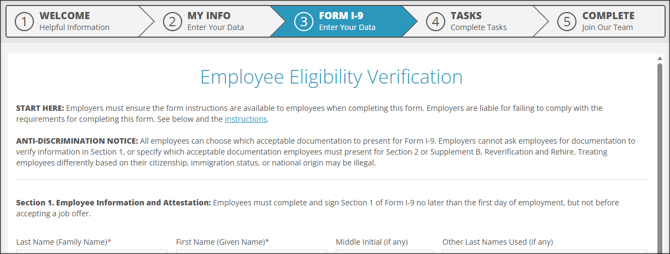
More Info: Take a look at our ESS Onboarding Guide for more information about the employee's onboarding experience.
Collect Form I-9 Information During Onboarding
To add the Form I-9 tab to your employees' Onboarding experience, you must edit the Onboarding Template being used by your employees. To access Onboarding Templates, navigate to HR Admin (module) → Hire Employees → Onboarding Templates.
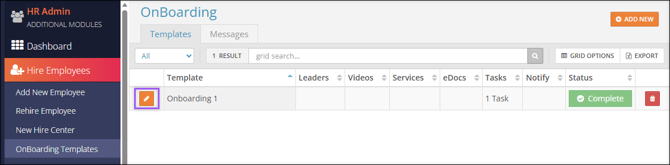
- Select Edit
 to manage an Onboarding Template.
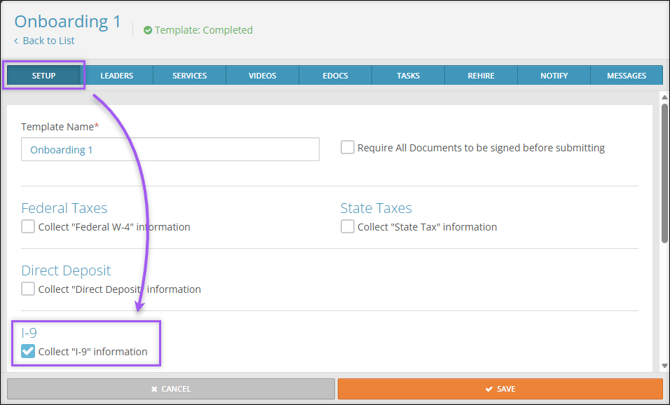
 - In the Setup tab, I-9 section, select the Collect "I-9" information checkbox.
- Select Save. All employees assigned to this Onboarding Template going forward will experience the Form I-9 tab during Onboarding.
Manage Employee Form I-9 Information
Employers can manage employee Form I-9 information by navigating to HR Admin → Compliance → I-9.
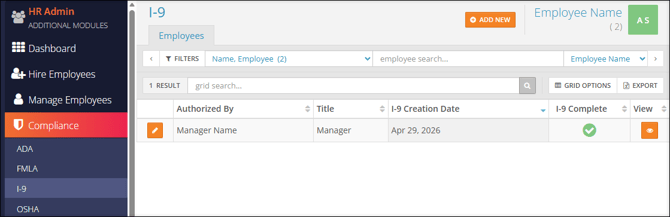
More Info: Learn more about Compliance I-9: Employees.