---
title: "HR Setup: Employee Group"
description: Checkwriters Knowledge Base
---
[Skip to content](https://help.checkwriters.com/knowledge/hr-setup-employee-group#main-content)
English
Show submenu for translations

Open main navigation
Close main navigation
- English
Show submenu for translations
- [Checkwriters Login](https://www.checkwriterspayrollhr.com/)
[Checkwriters Login](https://www.checkwriterspayrollhr.com/)
Hello. How can we help you?
- There are no suggestions because the search field is empty.
1. [Checkwriters Knowledge Base](https://help.checkwriters.com/knowledge?hsLang=en)
2. [HR Admin](https://help.checkwriters.com/knowledge/hr-admin?hsLang=en)
3. [ACA Center](https://help.checkwriters.com/knowledge/hr-admin?hsLang=en#aca-center)
# HR Setup: Employee Group
## Employee groups are tied to Cost & Compliance records and define the lowest cost single health plan for employees. The Employee Group page manages these groups.
[Navigate to Employee Group](https://help.checkwriters.com/knowledge/hr-setup-employee-group#navigate)
[Add Employee Group](https://help.checkwriters.com/knowledge/hr-setup-employee-group#add)
[Assign Employees to Groups](https://help.checkwriters.com/knowledge/hr-setup-employee-group#assign)
Companies whose lowest-cost single health plan is the same for all employees need only one Employee Group, defined as the “ACA All Employees” group by default.
Companies whose lowest-cost single health plan differs due to termination rules, waiting period, or contribution amounts need multiple Employee Groups. Cost and Compliance records will need to be set up for each employee group.
**Multi-Employee Group examples:**
- My organization offers two different health insurance plans (HMO & PPO), but my out-of-state employees are only eligible for the PPO plan, which costs employees more than the HMO.
- In this situation, two groups would be set up: one for in-state employees and another for out-of-state employees.
- My organization has union and non-union employees. Union employees are offered insurance through the union, but non-union employees are offered insurance through the company.
- In this situation, two groups would be set up: one for union and another for non-union employees.
**If you are unsure if setting up additional employee groups applies to your organization, contact** [**ACATeam@checkwriters.com**](mailto:ACATeam@checkwriters.com)
**Note:** Employees can only be assigned to one employee group.
---
### Navigate to Employee Group
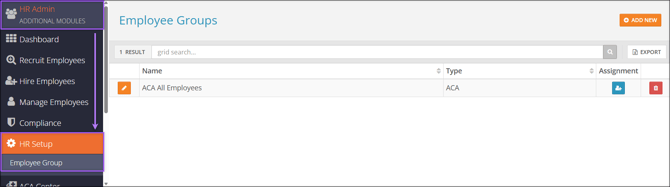
Find the Employee Group page by navigating to **HR Admin (module) → HR Setup → Employee Group**.
---
### Add Employee Groups
Select **Add New** to create a new Employee Group.
1. Enter the group **Name**
2. Set the **Type** to “ACA”.
3. Select **Save**.

---
### Assign Employees to Groups
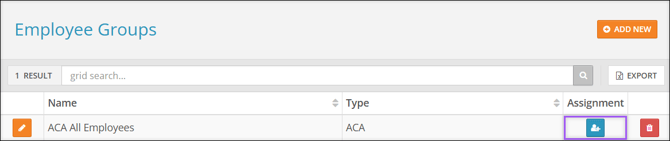
1. Select the **Assignment** icon on the group you want to assign employees to.
2. Use the **Assign** checkboxes to select employees who should be assigned to the selected Employee Group.
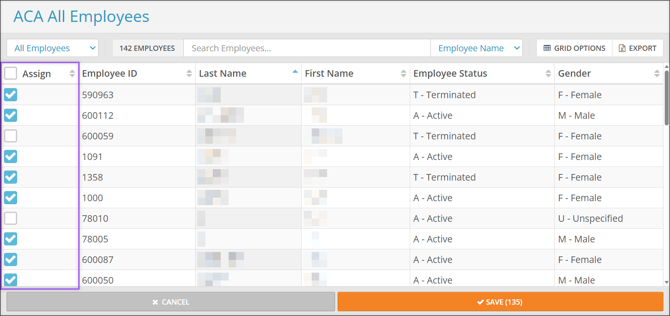
3. Select **Save**.
**Note:** To assign an employee to a different Employee Group than the one they are currently assigned, you must first unassign them from their current group. To do this,
1. Select the **Assignment** icon on their current Employee Group.
2. Uncheck the **Assign** checkbox for the appropriate employee.
3. Select **Save**.
4. Assign the employee to their new Employee Group.
- [2026 Year-End Material](https://help.checkwriters.com/knowledge/2026-year-end-material?hsLang=en)
- [Employee Self-Service](https://help.checkwriters.com/knowledge/employee-self-service?hsLang=en#main-content)
- [My Dashboard](https://help.checkwriters.com/knowledge/employee-self-service?hsLang=en#my-dashboard)
- [My Info](https://help.checkwriters.com/knowledge/employee-self-service?hsLang=en#my-info)
- [My Payroll](https://help.checkwriters.com/knowledge/employee-self-service?hsLang=en#my-payroll)
- [My Time](https://help.checkwriters.com/knowledge/employee-self-service?hsLang=en#my-time)
- [Settings](https://help.checkwriters.com/knowledge/employee-self-service?hsLang=en#settings)
- [My Documents](https://help.checkwriters.com/knowledge/employee-self-service?hsLang=en#my-documents)
- [HR Admin](https://help.checkwriters.com/knowledge/hr-admin?hsLang=en#main-content)
- [Recruit Employees](https://help.checkwriters.com/knowledge/hr-admin?hsLang=en#recruit-employees)
- [Hire Employees](https://help.checkwriters.com/knowledge/hr-admin?hsLang=en#hire-employees)
- [Manage Employees](https://help.checkwriters.com/knowledge/hr-admin?hsLang=en#manage-employees)
- [Compliance](https://help.checkwriters.com/knowledge/hr-admin?hsLang=en#compliance)
- [ACA Center](https://help.checkwriters.com/knowledge/hr-admin?hsLang=en#aca-center)
- [Communications](https://help.checkwriters.com/knowledge/hr-admin?hsLang=en#communications)
- [Document Center](https://help.checkwriters.com/knowledge/hr-admin?hsLang=en#document-center)
- [Security Control Center](https://help.checkwriters.com/knowledge/hr-admin?hsLang=en#security-control-center)
- [Company](https://help.checkwriters.com/knowledge/company?hsLang=en#main-content)
- [Two-Factor Authentication (2FA)](https://help.checkwriters.com/knowledge/company?hsLang=en#two-factor-authentication-2fa)
- [Accruals](https://help.checkwriters.com/knowledge/company?hsLang=en#accruals)
- [Earnings](https://help.checkwriters.com/knowledge/company?hsLang=en#earnings)
- [EE Custom Fields](https://help.checkwriters.com/knowledge/company?hsLang=en#ee-custom-fields)
- [Payroll](https://help.checkwriters.com/knowledge/payroll?hsLang=en#main-content)
- [Payroll](https://help.checkwriters.com/knowledge/payroll?hsLang=en#payroll)
- [Taxes](https://help.checkwriters.com/knowledge/payroll?hsLang=en#taxes)
- [Time Management](https://help.checkwriters.com/knowledge/time-management?hsLang=en#main-content)
- [Time Management](https://help.checkwriters.com/knowledge/time-management?hsLang=en#time-management)
- [Time Off Center](https://help.checkwriters.com/knowledge/time-management?hsLang=en#time-off-center)
- [Reporting](https://help.checkwriters.com/knowledge/reporting?hsLang=en#main-content)
- [Standard reports](https://help.checkwriters.com/knowledge/reporting?hsLang=en#standard-reports)
- [Custom reports](https://help.checkwriters.com/knowledge/reporting?hsLang=en#custom-reports)
- [Release Notes](https://help.checkwriters.com/knowledge/release-notes?hsLang=en#main-content)
- [2026 Release Notes](https://help.checkwriters.com/knowledge/release-notes?hsLang=en#2026-release-notes)
- [2025 Release Notes](https://help.checkwriters.com/knowledge/release-notes?hsLang=en#2025-release-notes)
- [2024 Release Notes](https://help.checkwriters.com/knowledge/release-notes?hsLang=en#2024-release-notes)
[](http://checkwriters.com)
[mailto:email@email.com](mailto:email@email.com)
Copyright © 2026, Checkwriters, Inc.