---
title: Forgot My Password
description: In the event you forget your Checkwriters password when logging in, we have a password reset process built into the login screen.
---
[Skip to content](https://help.checkwriters.com/knowledge/forgot-password#main-content)
English
Show submenu for translations

Open main navigation
Close main navigation
- English
Show submenu for translations
- [Checkwriters Login](https://www.checkwriterspayrollhr.com/)
[Checkwriters Login](https://www.checkwriterspayrollhr.com/)
Hello. How can we help you?
- There are no suggestions because the search field is empty.
1. [Checkwriters Knowledge Base](https://help.checkwriters.com/knowledge?hsLang=en)
2. [Employee Self-Service](https://help.checkwriters.com/knowledge/employee-self-service?hsLang=en)
# Forgot My Password
## Passwords can often be forgotten, especially when you haven’t logged on in a while. In the event you forget your Checkwriters password when logging in, we have a password reset process built into the login screen.
[Forgot your password?](https://help.checkwriters.com/knowledge/forgot-password#forgot)
[Verify Your Account](https://help.checkwriters.com/knowledge/forgot-password#verify)
[Check Your Inbox](https://help.checkwriters.com/knowledge/forgot-password#inbox)
[Enter Temporary Password](https://help.checkwriters.com/knowledge/forgot-password#temporary)
[Confirmation Email](https://help.checkwriters.com/knowledge/forgot-password#confirmation)
**Forgot your username?**
Reach out to your employer or HR manager. They will be able to look up the username you should use to log in.
### Forgot your password?
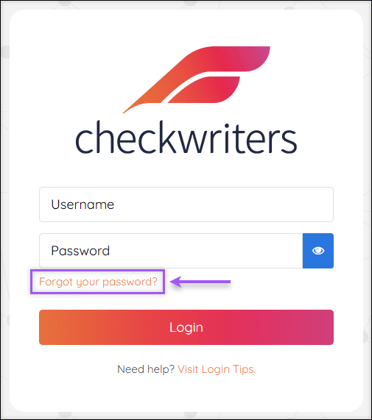
From the [checkwriterspayrollhr.com](http://www.checkwriterspayrollhr.com/) login page, select **Forgot your password?** to begin the password reset process.
### Verify Your Account
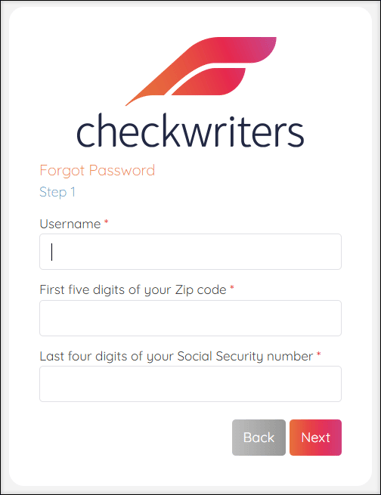
Enter your **Username** (likely your email address), first five digits of your **zip code**, and last four digits of your **Social Security number** in the appropriate fields. Select **Next**.
**Note:** This information is needed to verify your account.
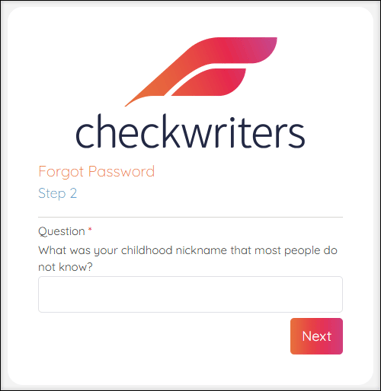
When you first enrolled in Checkwriters, you selected three security questions in case password recovery was needed. Correctly answer one of the three security questions and select **Next**.
### Check Your Inbox
Check your email inbox for a message from [notifications@mg.checkwriters.com](mailto:notifications@mg.checkwriters.com). This email will provide a Temporary Password that you will use to reset your password.
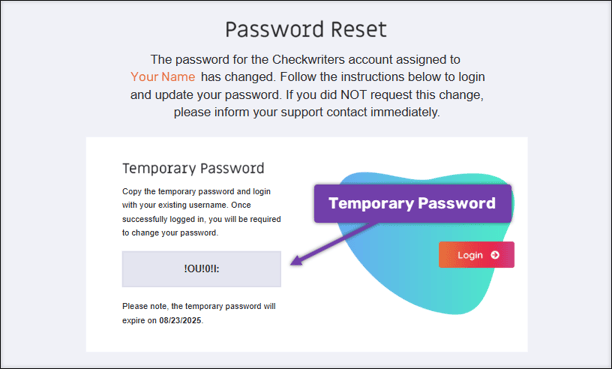
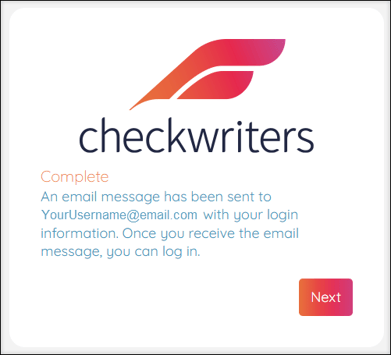
Return to Checkwriters and select **Next** on the Complete message.
### Enter Temporary Password
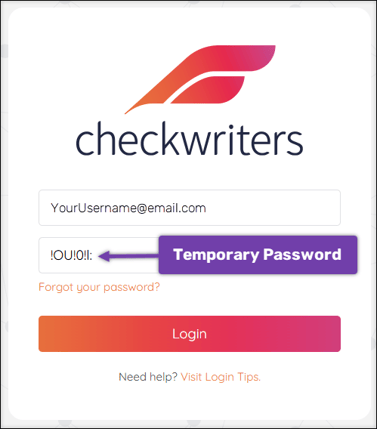
1. After returning to the Checkwriters login screen, enter your **Username** in the appropriate field.
2. In the **Password** field, enter the **Temporary Password** you received via email.
3. Select **Login**.
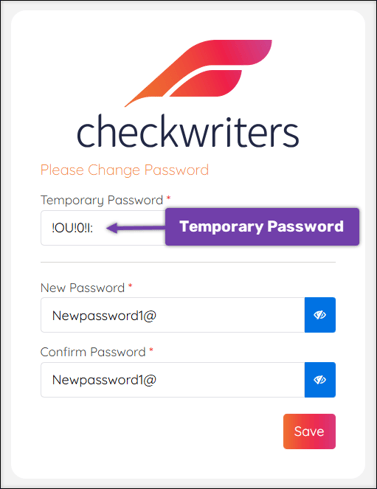
You will now be prompted to change your password from the temporary one to a new password of your choosing.
1. Enter the **Temporary Password** in the **Current Password** field.
2. Enter a new password of your choosing in the **New Password** field.
3. Re-enter a new password of your choosing in the **Confirm Password** field.
4. Select **Save**.
### Confirmation Email
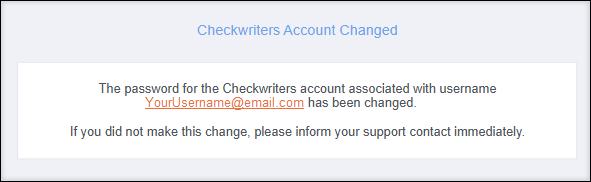
After successfully changing your password, you will receive an email confirmation from [notifications@mg.checkwriters.com](mailto:notifications@mg.checkwriters.com).
- [2026 Year-End Material](https://help.checkwriters.com/knowledge/2026-year-end-material?hsLang=en)
- [Employee Self-Service](https://help.checkwriters.com/knowledge/employee-self-service?hsLang=en#main-content)
- [My Dashboard](https://help.checkwriters.com/knowledge/employee-self-service?hsLang=en#my-dashboard)
- [My Info](https://help.checkwriters.com/knowledge/employee-self-service?hsLang=en#my-info)
- [My Payroll](https://help.checkwriters.com/knowledge/employee-self-service?hsLang=en#my-payroll)
- [My Time](https://help.checkwriters.com/knowledge/employee-self-service?hsLang=en#my-time)
- [Settings](https://help.checkwriters.com/knowledge/employee-self-service?hsLang=en#settings)
- [My Documents](https://help.checkwriters.com/knowledge/employee-self-service?hsLang=en#my-documents)
- [HR Admin](https://help.checkwriters.com/knowledge/hr-admin?hsLang=en#main-content)
- [Recruit Employees](https://help.checkwriters.com/knowledge/hr-admin?hsLang=en#recruit-employees)
- [Hire Employees](https://help.checkwriters.com/knowledge/hr-admin?hsLang=en#hire-employees)
- [Manage Employees](https://help.checkwriters.com/knowledge/hr-admin?hsLang=en#manage-employees)
- [Compliance](https://help.checkwriters.com/knowledge/hr-admin?hsLang=en#compliance)
- [ACA Center](https://help.checkwriters.com/knowledge/hr-admin?hsLang=en#aca-center)
- [Communications](https://help.checkwriters.com/knowledge/hr-admin?hsLang=en#communications)
- [Document Center](https://help.checkwriters.com/knowledge/hr-admin?hsLang=en#document-center)
- [Security Control Center](https://help.checkwriters.com/knowledge/hr-admin?hsLang=en#security-control-center)
- [Company](https://help.checkwriters.com/knowledge/company?hsLang=en#main-content)
- [Two-Factor Authentication (2FA)](https://help.checkwriters.com/knowledge/company?hsLang=en#two-factor-authentication-2fa)
- [Accruals](https://help.checkwriters.com/knowledge/company?hsLang=en#accruals)
- [Earnings](https://help.checkwriters.com/knowledge/company?hsLang=en#earnings)
- [EE Custom Fields](https://help.checkwriters.com/knowledge/company?hsLang=en#ee-custom-fields)
- [Payroll](https://help.checkwriters.com/knowledge/payroll?hsLang=en#main-content)
- [Payroll](https://help.checkwriters.com/knowledge/payroll?hsLang=en#payroll)
- [Taxes](https://help.checkwriters.com/knowledge/payroll?hsLang=en#taxes)
- [Time Management](https://help.checkwriters.com/knowledge/time-management?hsLang=en#main-content)
- [Time Management](https://help.checkwriters.com/knowledge/time-management?hsLang=en#time-management)
- [Time Off Center](https://help.checkwriters.com/knowledge/time-management?hsLang=en#time-off-center)
- [Reporting](https://help.checkwriters.com/knowledge/reporting?hsLang=en#main-content)
- [Standard reports](https://help.checkwriters.com/knowledge/reporting?hsLang=en#standard-reports)
- [Custom reports](https://help.checkwriters.com/knowledge/reporting?hsLang=en#custom-reports)
- [Release Notes](https://help.checkwriters.com/knowledge/release-notes?hsLang=en#main-content)
- [2026 Release Notes](https://help.checkwriters.com/knowledge/release-notes?hsLang=en#2026-release-notes)
- [2025 Release Notes](https://help.checkwriters.com/knowledge/release-notes?hsLang=en#2025-release-notes)
- [2024 Release Notes](https://help.checkwriters.com/knowledge/release-notes?hsLang=en#2024-release-notes)
[](http://checkwriters.com)
[mailto:email@email.com](mailto:email@email.com)
Copyright © 2026, Checkwriters, Inc.