---
title: "Employee Center: Pay History"
description: The Pay History section of the Employee Center is where you can review employee wages and download employee paystubs.
---
[Skip to content](https://help.checkwriters.com/knowledge/employee-center-pay-history#main-content)
English
Show submenu for translations

Open main navigation
Close main navigation
- English
Show submenu for translations
- [Checkwriters Login](https://www.checkwriterspayrollhr.com/)
[Checkwriters Login](https://www.checkwriterspayrollhr.com/)
Hello. How can we help you?
- There are no suggestions because the search field is empty.
1. [Checkwriters Knowledge Base](https://help.checkwriters.com/knowledge?hsLang=en)
2. [HR Admin](https://help.checkwriters.com/knowledge/hr-admin?hsLang=en)
3. [Manage Employees](https://help.checkwriters.com/knowledge/hr-admin?hsLang=en#manage-employees)
# Employee Center: Pay History
## The Pay History section of the Employee Center is where you can review employee wages and download employee paystubs.
[Navigate to Pay History](https://help.checkwriters.com/knowledge/employee-center-pay-history#navigate)
[Layout](https://help.checkwriters.com/knowledge/employee-center-pay-history#layout)
[Earnings Report](https://help.checkwriters.com/knowledge/employee-center-pay-history#earnings-report)
[View Details](https://help.checkwriters.com/knowledge/employee-center-pay-history#view-details)
### Navigate to Pay History
Find the Pay History page by navigating to **HR Admin (module) → Manage Employees → Employee Center → select ** **Employee → Payroll (tab)→ Pay History (tab)**.

### Layout
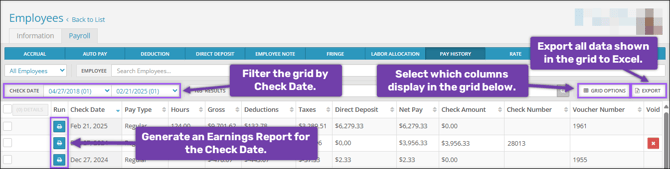
- Filter checks shown in the grid using the **Check Date** filters.
- Select **Grid Options** to add additional columns to the Labor Allocations grid.
- Select **Export** to export all data shown in the Pay History grid.
- Select **Run ** to generate an **Earnings Report** for a specific Check Date.
### Earnings Report
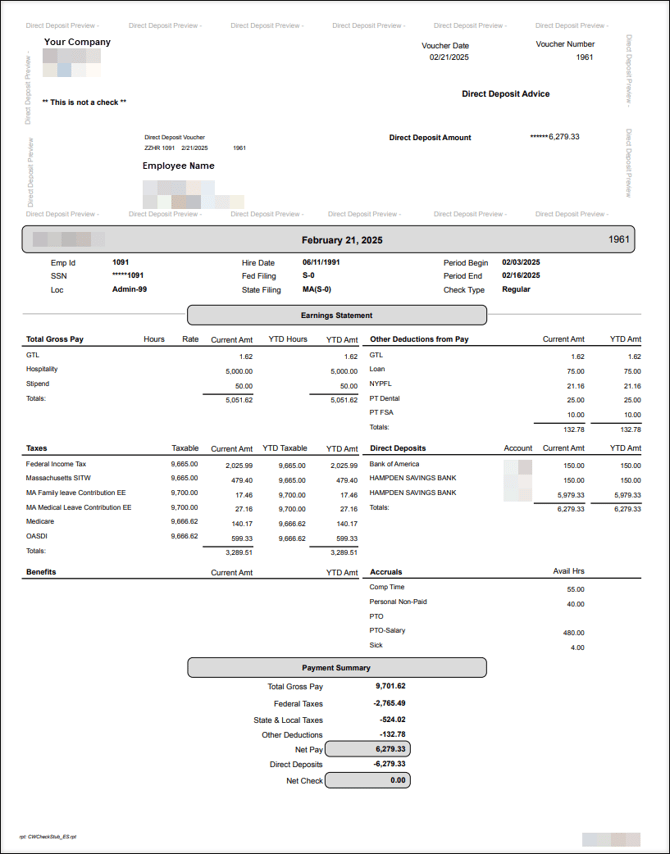
A check date’s Earnings Report consists of a Direct Deposit or Payroll Check preview, Earnings Statement, and Payment Summary. Below is an example of an employee’s Earnings Report with a Direct Deposit.
### View Details
In addition to downloading an Earnings Report, you can also view further details about Earnings, Deductions, Taxes, and Direct Deposits across multiple check dates. Select the check dates you wish to view, then select **Details**.

An aside will appear listing the Earnings, Deductions, Tax, and Direct Deposit totals.
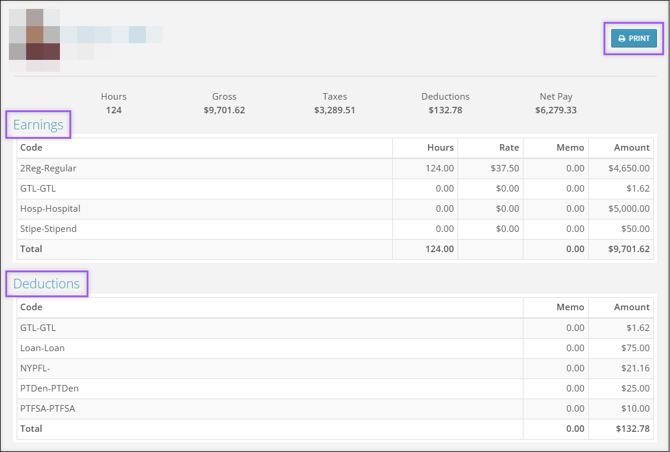
- **Print**: Select the print button to download or print the selected Pay History details.
- **Earnings**: Lists all earnings paid to the employee within the selected Check Dates, including Regular, Salary, Sick, Overtime, Personal, Vacation, and PTO. Memo codes, like retirement match, will also be listed in this section.
- **Deductions**: Lists all deductions taken out of the paychecks within the selected Check Dates, including child support, health insurance, loans, and retirement contributions. Non-taxable amounts (such as an after-tax reimbursement) will also be listed in this section.
- **Taxes**: Lists all of the employee's taxable wages and the amounts withheld from the paychecks within the selected Check Dates. These taxes can include Federal (FITW), State, Social Security, Medicare, and Family and Medical Leave.
- **Employer Taxes**: Lists all of the employer taxes withheld from the paychecks within the selected Check Dates. These taxes can include Federal Unemployment, State Unemployment, Social Security, and Medicare, etc.
- **Direct Deposits**: Lists which accounts received a direct deposit as well as the amount deposited into each account. Only the last four digits of the routing and account numbers will be visible.
- [Employee Self-Service](https://help.checkwriters.com/knowledge/employee-self-service?hsLang=en#main-content)
- [My Dashboard](https://help.checkwriters.com/knowledge/employee-self-service?hsLang=en#my-dashboard)
- [My Info](https://help.checkwriters.com/knowledge/employee-self-service?hsLang=en#my-info)
- [My Payroll](https://help.checkwriters.com/knowledge/employee-self-service?hsLang=en#my-payroll)
- [My Time](https://help.checkwriters.com/knowledge/employee-self-service?hsLang=en#my-time)
- [Settings](https://help.checkwriters.com/knowledge/employee-self-service?hsLang=en#settings)
- [My Documents](https://help.checkwriters.com/knowledge/employee-self-service?hsLang=en#my-documents)
- [HR Admin](https://help.checkwriters.com/knowledge/hr-admin?hsLang=en#main-content)
- [Recruit Employees](https://help.checkwriters.com/knowledge/hr-admin?hsLang=en#recruit-employees)
- [Hire Employees](https://help.checkwriters.com/knowledge/hr-admin?hsLang=en#hire-employees)
- [Manage Employees](https://help.checkwriters.com/knowledge/hr-admin?hsLang=en#manage-employees)
- [Compliance](https://help.checkwriters.com/knowledge/hr-admin?hsLang=en#compliance)
- [ACA Center](https://help.checkwriters.com/knowledge/hr-admin?hsLang=en#aca-center)
- [Communications](https://help.checkwriters.com/knowledge/hr-admin?hsLang=en#communications)
- [Document Center](https://help.checkwriters.com/knowledge/hr-admin?hsLang=en#document-center)
- [Security Control Center](https://help.checkwriters.com/knowledge/hr-admin?hsLang=en#security-control-center)
- [Company](https://help.checkwriters.com/knowledge/company?hsLang=en#main-content)
- [Two-Factor Authentication (2FA)](https://help.checkwriters.com/knowledge/company?hsLang=en#two-factor-authentication-2fa)
- [Accruals](https://help.checkwriters.com/knowledge/company?hsLang=en#accruals)
- [Earnings](https://help.checkwriters.com/knowledge/company?hsLang=en#earnings)
- [EE Custom Fields](https://help.checkwriters.com/knowledge/company?hsLang=en#ee-custom-fields)
- [Payroll](https://help.checkwriters.com/knowledge/payroll?hsLang=en#main-content)
- [Payroll](https://help.checkwriters.com/knowledge/payroll?hsLang=en#payroll)
- [Taxes](https://help.checkwriters.com/knowledge/payroll?hsLang=en#taxes)
- [Time Management](https://help.checkwriters.com/knowledge/time-management?hsLang=en#main-content)
- [Time Management](https://help.checkwriters.com/knowledge/time-management?hsLang=en#time-management)
- [Time Off Center](https://help.checkwriters.com/knowledge/time-management?hsLang=en#time-off-center)
- [Reporting](https://help.checkwriters.com/knowledge/reporting?hsLang=en#main-content)
- [Standard reports](https://help.checkwriters.com/knowledge/reporting?hsLang=en#standard-reports)
- [Custom reports](https://help.checkwriters.com/knowledge/reporting?hsLang=en#custom-reports)
- [Release Notes](https://help.checkwriters.com/knowledge/release-notes?hsLang=en#main-content)
- [2026 Release Notes](https://help.checkwriters.com/knowledge/release-notes?hsLang=en#2026-release-notes)
- [2025 Release Notes](https://help.checkwriters.com/knowledge/release-notes?hsLang=en#2025-release-notes)
- [2024 Release Notes](https://help.checkwriters.com/knowledge/release-notes?hsLang=en#2024-release-notes)
[](http://checkwriters.com)
[mailto:email@email.com](mailto:email@email.com)
Copyright © 2026, Checkwriters, Inc.