---
title: "Document Center: Document Type Security"
description: The Document Type Security page manages the Document Types available to your company.
---
[Skip to content](https://help.checkwriters.com/knowledge/document-center-document-type-security#main-content)
English
Show submenu for translations

Open main navigation
Close main navigation
- English
Show submenu for translations
- [Checkwriters Login](https://www.checkwriterspayrollhr.com/)
[Checkwriters Login](https://www.checkwriterspayrollhr.com/)
Hello. How can we help you?
- There are no suggestions because the search field is empty.
1. [Checkwriters Knowledge Base](https://help.checkwriters.com/knowledge?hsLang=en)
2. [HR Admin](https://help.checkwriters.com/knowledge/hr-admin?hsLang=en)
3. [Document Center](https://help.checkwriters.com/knowledge/hr-admin?hsLang=en#document-center)
# Document Center: Document Type Security
## The Document Type Security page manages the Document Types available to your company.
[Navigate to Document Type Security](https://help.checkwriters.com/knowledge/document-center-document-type-security#navigate)
[Layout](https://help.checkwriters.com/knowledge/document-center-document-type-security#layout)
- [Predefined Document Types](https://help.checkwriters.com/knowledge/document-center-document-type-security#predefined)
- [Add a New Document Type](https://help.checkwriters.com/knowledge/document-center-document-type-security#add-new)
### Navigate to Document Type Security
Access the Document Type Security page by navigating to **HR Admin (module) → Document Center → Document Type Security**.
### Layout
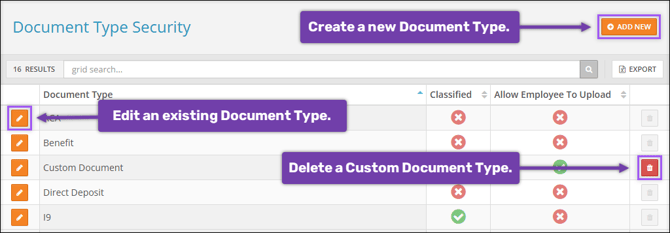
- Select **Add New** to create a new Document Type.
- Select **Edit ** to edit an existing Document Type.
- Select **Delete ** to delete an existing custom Document Type.
#### Predefined Document Types
Your company is set up with a series of predefined document types that are necessary for core functionalities. You will not be able to delete these document types, but you can choose to **Edit** their **Classified** status and, if utilized by your company, their **Allow Employee To Upload** status. These predefined types include:
- ACA
- Benefit
- Direct Deposit
- I9
- Local-PA
- Medical
- PayCard
- Review
- State
- Training
- W4
- Warning
- WOTC
- WOTC Verification
**Note:** Employee Document Upload is a feature included in our Premium package. For more information or to upgrade your package, please contact Checkwriters Client Support at [support@checkwriters.com](mailto:support@checkwriters.com).
#### Add a New Document Type
In addition to these predefined document types, users with appropriate access can create additional document types to be used throughout the system.
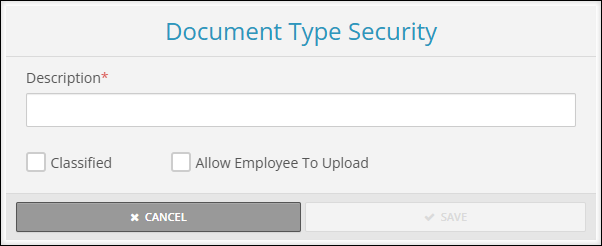
- Select **Add New** to create a new Document Type.
- Enter a unique **Description** for the Document Type. This description cannot exceed 20 characters and cannot include the reserved terms “esign” or “state-”.
- Select the **Classified** checkbox if the Document Type should be considered as such.
- Select the **Allow Employee To Upload** checkbox if ESS users should be allowed to upload files to this document type. Learn more about [Uploading Documents to ESS](https://help.checkwriters.com/knowledge/ess-my-documents?hsLang=en).
- You will not be able to delete a custom document type if there are [employee documents](https://help.checkwriters.com/knowledge/ess-my-documents?hsLang=en) assigned to that type.
**Note:** Employee Document Upload is a feature included in our Premium package. For more information or to upgrade your package, please contact Checkwriters Client Support at [support@checkwriters.com](mailto:support@checkwriters.com).
**Note:** If your company uses Onboarding, employees will be able to [upload documents to ESS](https://help.checkwriters.com/knowledge/ess-my-documents?hsLang=en) after they have been activated in Checkwriters.
- [2026 Year-End Material](https://help.checkwriters.com/knowledge/2026-year-end-material?hsLang=en)
- [Employee Self-Service](https://help.checkwriters.com/knowledge/employee-self-service?hsLang=en#main-content)
- [My Dashboard](https://help.checkwriters.com/knowledge/employee-self-service?hsLang=en#my-dashboard)
- [My Info](https://help.checkwriters.com/knowledge/employee-self-service?hsLang=en#my-info)
- [My Payroll](https://help.checkwriters.com/knowledge/employee-self-service?hsLang=en#my-payroll)
- [My Time](https://help.checkwriters.com/knowledge/employee-self-service?hsLang=en#my-time)
- [Settings](https://help.checkwriters.com/knowledge/employee-self-service?hsLang=en#settings)
- [My Documents](https://help.checkwriters.com/knowledge/employee-self-service?hsLang=en#my-documents)
- [HR Admin](https://help.checkwriters.com/knowledge/hr-admin?hsLang=en#main-content)
- [Recruit Employees](https://help.checkwriters.com/knowledge/hr-admin?hsLang=en#recruit-employees)
- [Hire Employees](https://help.checkwriters.com/knowledge/hr-admin?hsLang=en#hire-employees)
- [Manage Employees](https://help.checkwriters.com/knowledge/hr-admin?hsLang=en#manage-employees)
- [Compliance](https://help.checkwriters.com/knowledge/hr-admin?hsLang=en#compliance)
- [ACA Center](https://help.checkwriters.com/knowledge/hr-admin?hsLang=en#aca-center)
- [Communications](https://help.checkwriters.com/knowledge/hr-admin?hsLang=en#communications)
- [Document Center](https://help.checkwriters.com/knowledge/hr-admin?hsLang=en#document-center)
- [Security Control Center](https://help.checkwriters.com/knowledge/hr-admin?hsLang=en#security-control-center)
- [Company](https://help.checkwriters.com/knowledge/company?hsLang=en#main-content)
- [Two-Factor Authentication (2FA)](https://help.checkwriters.com/knowledge/company?hsLang=en#two-factor-authentication-2fa)
- [Accruals](https://help.checkwriters.com/knowledge/company?hsLang=en#accruals)
- [Earnings](https://help.checkwriters.com/knowledge/company?hsLang=en#earnings)
- [EE Custom Fields](https://help.checkwriters.com/knowledge/company?hsLang=en#ee-custom-fields)
- [Payroll](https://help.checkwriters.com/knowledge/payroll?hsLang=en#main-content)
- [Payroll](https://help.checkwriters.com/knowledge/payroll?hsLang=en#payroll)
- [Taxes](https://help.checkwriters.com/knowledge/payroll?hsLang=en#taxes)
- [Time Management](https://help.checkwriters.com/knowledge/time-management?hsLang=en#main-content)
- [Time Management](https://help.checkwriters.com/knowledge/time-management?hsLang=en#time-management)
- [Time Off Center](https://help.checkwriters.com/knowledge/time-management?hsLang=en#time-off-center)
- [Reporting](https://help.checkwriters.com/knowledge/reporting?hsLang=en#main-content)
- [Standard reports](https://help.checkwriters.com/knowledge/reporting?hsLang=en#standard-reports)
- [Custom reports](https://help.checkwriters.com/knowledge/reporting?hsLang=en#custom-reports)
- [Release Notes](https://help.checkwriters.com/knowledge/release-notes?hsLang=en#main-content)
- [2026 Release Notes](https://help.checkwriters.com/knowledge/release-notes?hsLang=en#2026-release-notes)
- [2025 Release Notes](https://help.checkwriters.com/knowledge/release-notes?hsLang=en#2025-release-notes)
- [2024 Release Notes](https://help.checkwriters.com/knowledge/release-notes?hsLang=en#2024-release-notes)
[](http://checkwriters.com)
[mailto:email@email.com](mailto:email@email.com)
Copyright © 2026, Checkwriters, Inc.