---
title: "04/29/2026 Release Notes: ESS and Onboarding Document Uploads"
description: These release notes describe new functionality for Premier Clients, allowing employees to upload documents in their Checkwriters ESS portal and during the Onboarding process.
---
[Skip to content](https://help.checkwriters.com/knowledge/04/29/2026-release-notes#main-content)
English
Show submenu for translations

Open main navigation
Close main navigation
- English
Show submenu for translations
- [Checkwriters Login](https://www.checkwriterspayrollhr.com/)
[Checkwriters Login](https://www.checkwriterspayrollhr.com/)
Hello. How can we help you?
- There are no suggestions because the search field is empty.
1. [Checkwriters Knowledge Base](https://help.checkwriters.com/knowledge?hsLang=en)
2. [Release Notes](https://help.checkwriters.com/knowledge/release-notes?hsLang=en)
3. [2026 Release Notes](https://help.checkwriters.com/knowledge/release-notes?hsLang=en#2026-release-notes)
# 04/29/2026 Release Notes: ESS and Onboarding Document Uploads
## These release notes document improvements to the Checkwriters software released on 04/29/2026.
We have added new functionality for **Premier Clients**, allowing employees to upload documents in their Checkwriters ESS portal and during the Onboarding process.
[ESS Document Upload](https://help.checkwriters.com/knowledge/04/29/2026-release-notes#ESS-upload)
[Uploads in Onboarding Templates](https://help.checkwriters.com/knowledge/04/29/2026-release-notes#onboarding-templates)
- [Create and Manage Uploads](https://help.checkwriters.com/knowledge/04/29/2026-release-notes#create-manage)
- [Add an Upload to an Onboarding Template](https://help.checkwriters.com/knowledge/04/29/2026-release-notes#add-to-template)
- [Add an Upload to a Specific Employee's Onboarding](https://help.checkwriters.com/knowledge/04/29/2026-release-notes#add-to-employee)
### ESS Document Upload
Employees can now **Upload** files to their **My Documents** page.
**More Info:** Learn more about how employees can [Upload Documents to ESS](https://help.checkwriters.com/knowledge/ess-upload-documents?hsLang=en).
Which documents an employee can upload is dictated by the employer in the **Document Center → Document Type Security** page.
**More Info:** Learn more about creating [Document Types](https://help.checkwriters.com/knowledge/document-center-document-type-security?hsLang=en).
**Important:** Uploaded files are scanned for malware. If a file fails the malware scan, employees will be asked to upload a new file.
### Uploads in Onboarding Templates
Uploads in Onboarding allow employees to submit important files as requested by the employer.
#### Create and Manage Uploads
To create and manage Uploads, navigate to **HR Admin (module) → Hire Employees → Onboarding Templates → Uploads (tab)**.
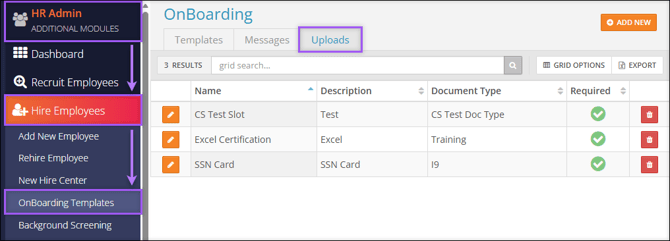
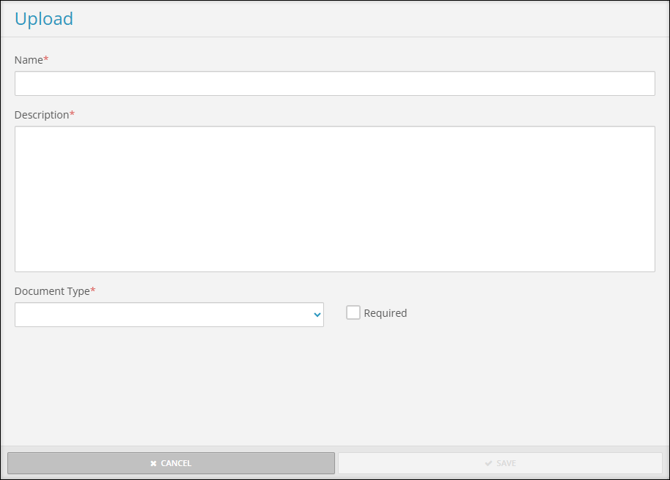
Select **Add New** to create a new Upload. The Upload aside will appear with the following fields:
- **Name**: Provide a title for the Upload.
- **Description**: Provide a short description of what the upload will require.
- **Document Type**: Select a Document Type from the dropdown menu.
- **Required**: Select the checkbox to make this upload required during Employee Onboarding.
Select **Edit ** to manage an existing Upload.
#### Add an Upload to an Onboarding Template
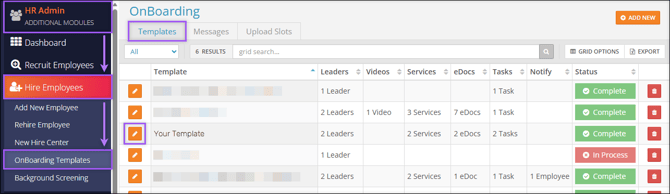
To add an Upload to an existing Onboarding Template, navigate to **HR Admin (module) → Hire Employees → Onboarding Templates → Template (tab) → Edit  Template → Uploads (tab)**.
- Drag an Upload from the **Not Included** section to the **Included** section.
- Select **Edit ** to change whether the upload is required.
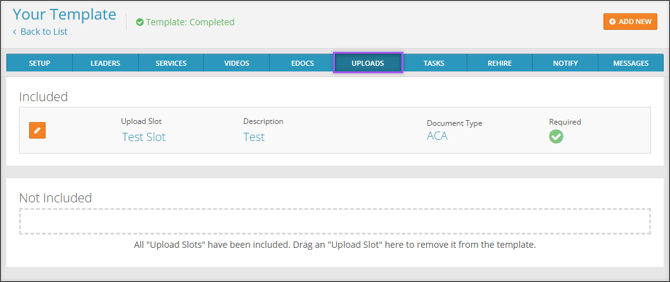
**Note:** You may also select **Add New** to create a new Upload. This will be saved and added to the Upload options shown in the [Create and Manage Uploads](https://help.checkwriters.com/knowledge/04/29/2026-release-notes#create-manage) section of this article.
#### Add an Upload to a Specific Employee's Onboarding
In addition to adding an Upload to an entire Onboarding Template, Uploads can be tailored to individual New Hires.
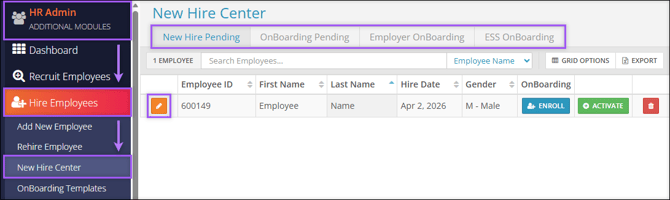
To add an Upload to an individual employee's Onboarding, navigate to **HR Admin (module) → Hire Employees → New Hire Center**. Within any of the four tabs of the New Hire Center, select **Edit ** on an employee.
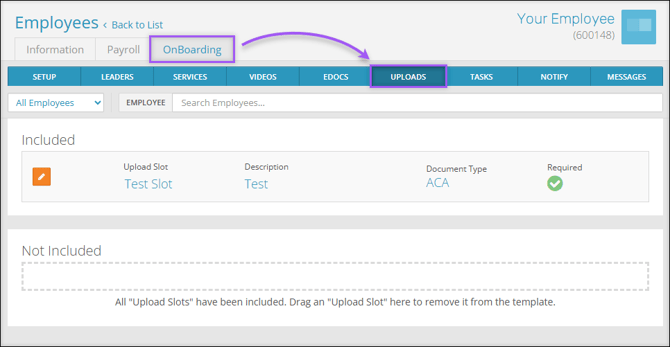
From the employee's editing page, navigate to **Onboarding (tab) → Uploads (tab)**.
- Drag an Upload from the **Not Included** section to the **Included** section to add it to an employee's Onboarding Tasks.
- Select **Edit ** to change whether the upload is required.
**Note:** Changes made on this page will only apply to the selected employee.
**More Info:** Check out our [ESS Onboarding Guide](https://help.checkwriters.com/knowledge/ess-onboarding-guide?hsLang=en) for new employees.
- [2026 Year-End Material](https://help.checkwriters.com/knowledge/2026-year-end-material?hsLang=en)
- [Employee Self-Service](https://help.checkwriters.com/knowledge/employee-self-service?hsLang=en#main-content)
- [My Dashboard](https://help.checkwriters.com/knowledge/employee-self-service?hsLang=en#my-dashboard)
- [My Info](https://help.checkwriters.com/knowledge/employee-self-service?hsLang=en#my-info)
- [My Payroll](https://help.checkwriters.com/knowledge/employee-self-service?hsLang=en#my-payroll)
- [My Time](https://help.checkwriters.com/knowledge/employee-self-service?hsLang=en#my-time)
- [Settings](https://help.checkwriters.com/knowledge/employee-self-service?hsLang=en#settings)
- [My Documents](https://help.checkwriters.com/knowledge/employee-self-service?hsLang=en#my-documents)
- [HR Admin](https://help.checkwriters.com/knowledge/hr-admin?hsLang=en#main-content)
- [Recruit Employees](https://help.checkwriters.com/knowledge/hr-admin?hsLang=en#recruit-employees)
- [Hire Employees](https://help.checkwriters.com/knowledge/hr-admin?hsLang=en#hire-employees)
- [Manage Employees](https://help.checkwriters.com/knowledge/hr-admin?hsLang=en#manage-employees)
- [Compliance](https://help.checkwriters.com/knowledge/hr-admin?hsLang=en#compliance)
- [ACA Center](https://help.checkwriters.com/knowledge/hr-admin?hsLang=en#aca-center)
- [Communications](https://help.checkwriters.com/knowledge/hr-admin?hsLang=en#communications)
- [Document Center](https://help.checkwriters.com/knowledge/hr-admin?hsLang=en#document-center)
- [Security Control Center](https://help.checkwriters.com/knowledge/hr-admin?hsLang=en#security-control-center)
- [Company](https://help.checkwriters.com/knowledge/company?hsLang=en#main-content)
- [Two-Factor Authentication (2FA)](https://help.checkwriters.com/knowledge/company?hsLang=en#two-factor-authentication-2fa)
- [Accruals](https://help.checkwriters.com/knowledge/company?hsLang=en#accruals)
- [Earnings](https://help.checkwriters.com/knowledge/company?hsLang=en#earnings)
- [EE Custom Fields](https://help.checkwriters.com/knowledge/company?hsLang=en#ee-custom-fields)
- [Payroll](https://help.checkwriters.com/knowledge/payroll?hsLang=en#main-content)
- [Payroll](https://help.checkwriters.com/knowledge/payroll?hsLang=en#payroll)
- [Taxes](https://help.checkwriters.com/knowledge/payroll?hsLang=en#taxes)
- [Time Management](https://help.checkwriters.com/knowledge/time-management?hsLang=en#main-content)
- [Time Management](https://help.checkwriters.com/knowledge/time-management?hsLang=en#time-management)
- [Time Off Center](https://help.checkwriters.com/knowledge/time-management?hsLang=en#time-off-center)
- [Reporting](https://help.checkwriters.com/knowledge/reporting?hsLang=en#main-content)
- [Standard reports](https://help.checkwriters.com/knowledge/reporting?hsLang=en#standard-reports)
- [Custom reports](https://help.checkwriters.com/knowledge/reporting?hsLang=en#custom-reports)
- [Release Notes](https://help.checkwriters.com/knowledge/release-notes?hsLang=en#main-content)
- [2026 Release Notes](https://help.checkwriters.com/knowledge/release-notes?hsLang=en#2026-release-notes)
- [2025 Release Notes](https://help.checkwriters.com/knowledge/release-notes?hsLang=en#2025-release-notes)
- [2024 Release Notes](https://help.checkwriters.com/knowledge/release-notes?hsLang=en#2024-release-notes)
[](http://checkwriters.com)
[mailto:email@email.com](mailto:email@email.com)
Copyright © 2026, Checkwriters, Inc.